GMKtec EVO-X5 Pro mini PC review: I tested large LLMs on this machine and the results and speed were impressive
GMKtec EVO-X5 Pro: 30-second review
The EVO-X5 packs in the latest Strix Halo CPU, and while the updates to the specifications of the Ryzen AI Max+ PRO 495 processor over the Ryzen AI Max+ 395 may look modest, when you give it the additional boost of 196GB of unified memory and the internal space for up to 24TB of storage, you suddenly have a machine whose abilities far exceed the superb EVO-X3 I reviewed recently.
Like so many of these small machines, it’s hard to believe the power it contains when it arrives. The box is small and relatively discreet, a departure from the large, powerful gaming and AI workstations I usually associate with its computing power. Part of the reason for that size reduction is that this is the processing hub, and while the AMD Radeon 8065S graphics will see you through a decent bit of gaming, if you want that full GPU power alongside what’s on offer with the CPU, you’ll need to break out to an external GPU option.
This distinction makes the machine's intended use clear. You can use it on its own as a powerful workstation, handling everything from office day tasks to video and image editing, and even 3D work. You can also rack it alongside additional EVO-X5 Pros to build an almighty AI personal data centre, with features such as the OOB, which lets you access and control the machine even if it’s mid-blue-screen or terminal crash. However, professional IT skills will inevitably also be needed.
On a smaller scale, and in the way that I’ve checked this machine out in this review, is to check the day-to-day function first. Is this $5000 machine good enough to run Microsoft Windows, Office, Adobe Creative Suite, edit images, video, and audio, and all the base functions a powerful machine in the office or studio needs to do, especially at that price?
But to go deeper: if this machine is going to cost almost double today’s pretty decent workstations, why should I pay all that extra money for a machine like this? Am I just paying for the latest AI-enhanced CPUs, or is there more to it? Can the machine's capabilities offset that cost?
To put it to the test, I’ve run through all the usual benchmarks and real-world tests, but after testing a good volume of AI headline-leading mini PCs, I want to see if it can take on a little more.
For instance, can it not only code a straight site, but also build a site from designs? What is the image-generation capability, and can it really run a 300B LLM without stalling? What I’ve noticed with some smaller mini PCs recently is that while they meet the specs and perform impressively, most hit their limits pretty quickly. However, with far more unified RAM than most, this machine has plenty of headroom.
The main test for me here is: can it effectively edit video in DaVinci Resolve? While my workstation can do this, it takes time, and a couple of the machines I’ve looked at recently have hit their limits with that kind of processing.
This looks to be a formidable machine among the best mini PCs I've reviewed, and one that will suit many looking into the use of AI in their day-to-day workflows. But all this power comes at a huge cost, and in balance, is this machine worth that price?
GMKtec EVO-X5 Pro: Price and availability
- How much does it cost? From £5,299 / $6,799
- When is it out? Available now
- Where can you get it? Directly from GMKtec or Amazon
At present, the machine has just gone on sale and is available for $6799 from GMKtec in the US, and £5,299 from the UK website.
The machine is available in either a 2TB or 4TB version, with a $400 / £300 increase for the extra storage.
- Value: 4 / 5
GMKtec EVO-X5 Pro: Specs
CPU: AMD Ryzen AI Max+ PRO 495, 16 cores/32 threads
GPU: AMD Radeon 8065S, 40 RDNA 3.5 compute units
NPU: AMD XDNA 2, 55 TOPS
RAM: 192GB LPDDR5X-8533 unified memory, non-upgradeable
Storage: 2TB or 4TB PCIe 4.0 M.2 2280 SSD, three slots, up to 24TB total
Front Ports: 2 x USB 3.2 Gen 2, 2 x USB4, 3.5mm audio, P-Mode button, CMOS reset
Rear Ports: HDMI 2.1, 2 x USB4 v2 80Gbps, 2 x USB 2.0, 2 x 10GbE RJ-45 DASH, 3.5mm audio
Wireless: Wi-Fi 7
VESA Mount: No
Dimensions: 221 x 80 x 195mm
Weight: 2.5kg
Power: 54W–120W selectable power modes, external power adapter
Operating System: Windows 11 Pro
GMKtec EVO-X5 Pro: Design
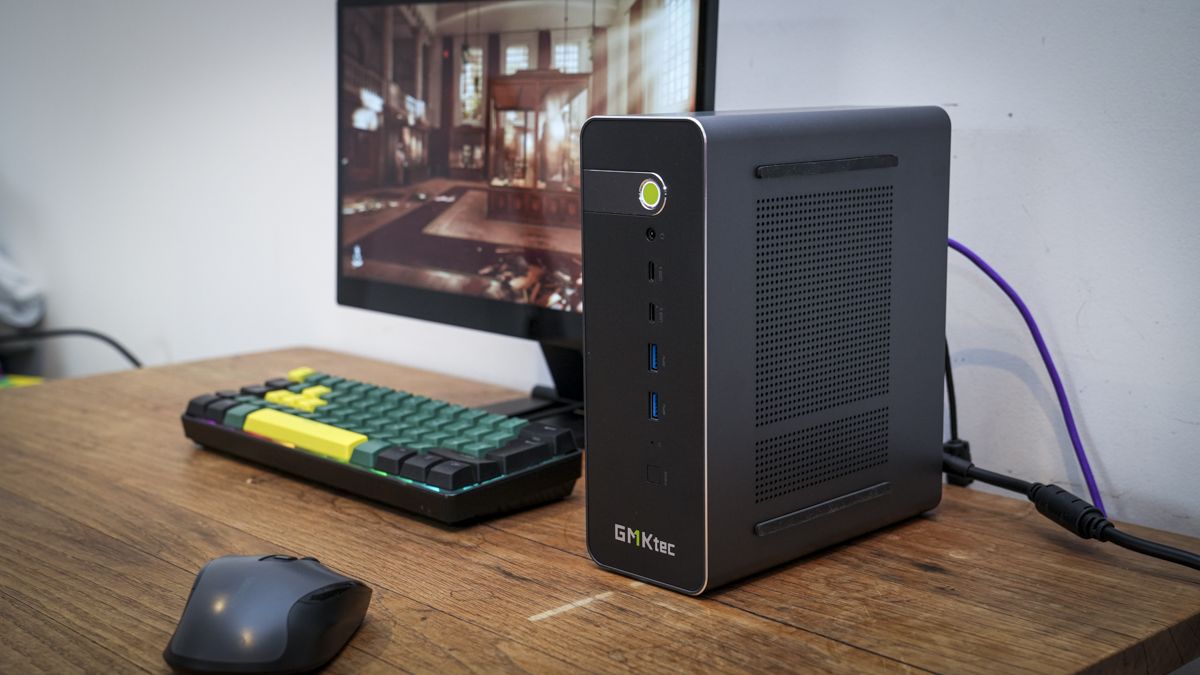
The mini PC is getting bigger; although still compact, it sits somewhere between a small tower desktop and the more traditional mini PC size. The styling is also spot on, with the ability to lay the machine flat or upright depending on your desk space. It’s also nicely designed with an understated all-metal black finish, though GMKtec has included its usual feature: a green power button. This button features fingerprint recognition.
The size, while not large, comes in at 221 × 80 × 195 mm, and in this review it sat neatly beside the monitor in a vertical position, taking up little desktop space. The weight at 2.5kg is substantial for a mini PC, but still far less than most workstations, so in a studio space or if you do need to take a machine out on site, this is a great option.
The build quality is what you would expect at this price, with the all-metal black finish giving it a high-quality look and feel. Aesthetically, this is one of the best-looking mini PCs I’ve seen, while remaining quite understated. Another design point: while this machine can be used on its own, it's also designed to work alongside others, so its size and weight make it easy to connect to additional EVO-X5s if that’s what you or your business needs.
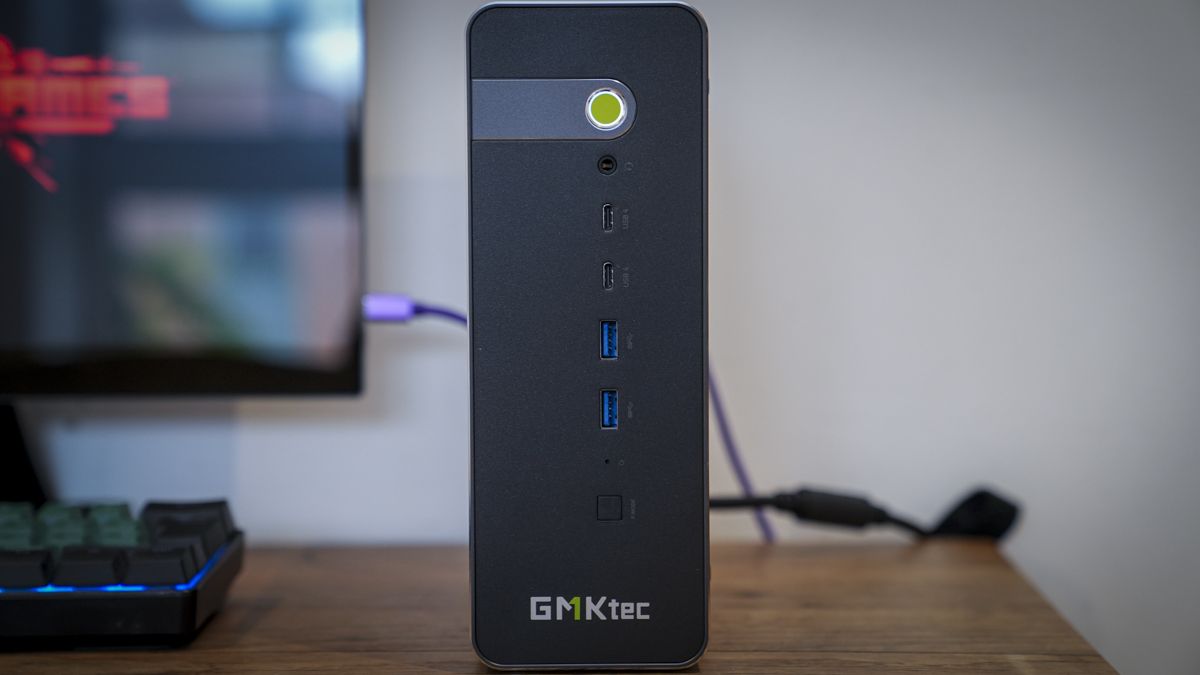
The front layout is minimalistic, with a few essentials across the front. These include the P-Mode button, CMOS reset, two USB 3.2 Gen 2 ports, two USB4 ports, a 3.5mm headphone jack, and the power button. The P-Mode button is a physical button for switching between the power modes, which include silent, balanced and performance, with each adjusting the amount of power that the machine draws from 54W up to 120W, and as I went through the benchmark tests, I realised just how much difference this P-Mode button can make.
That power draw helps explain the power brick that comes with the mini PC, which isn't much smaller than those of many standard mini PCs, but, as ever, can be tucked out of sight behind the machine.
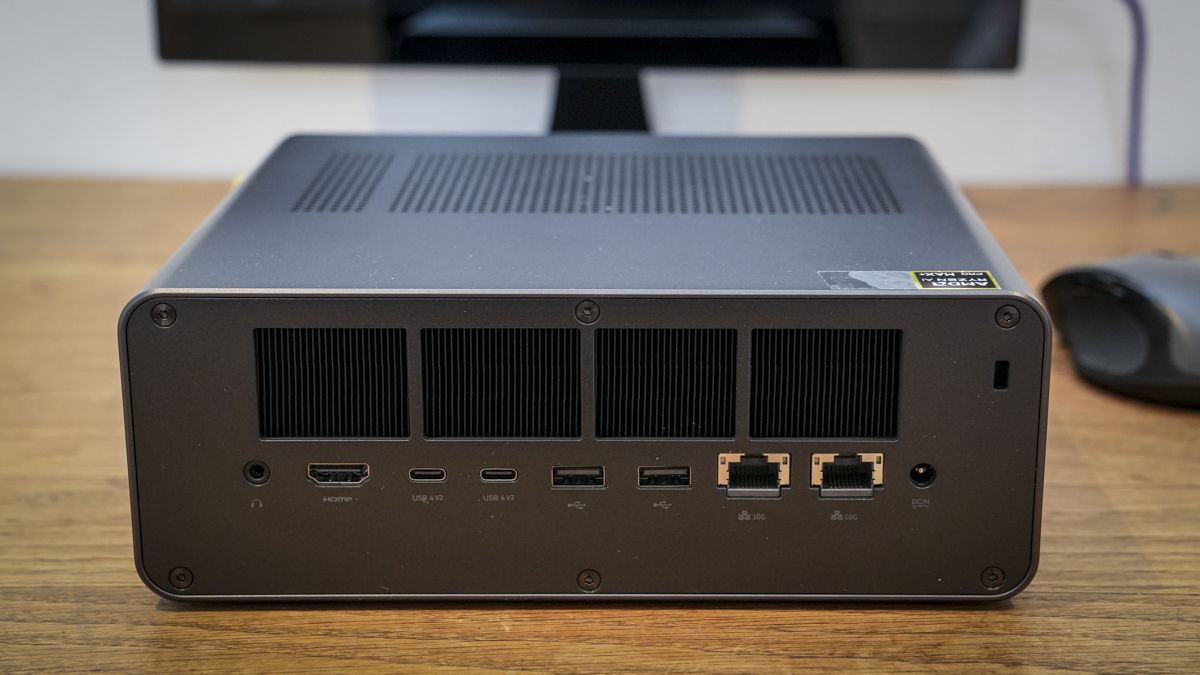
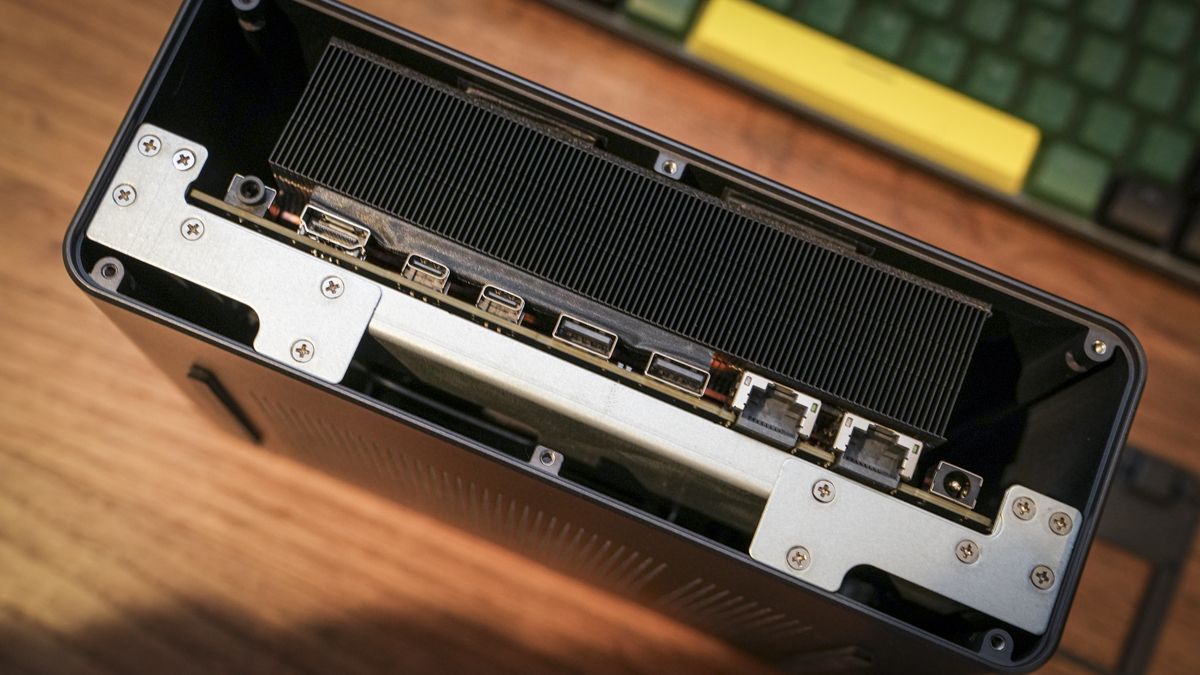
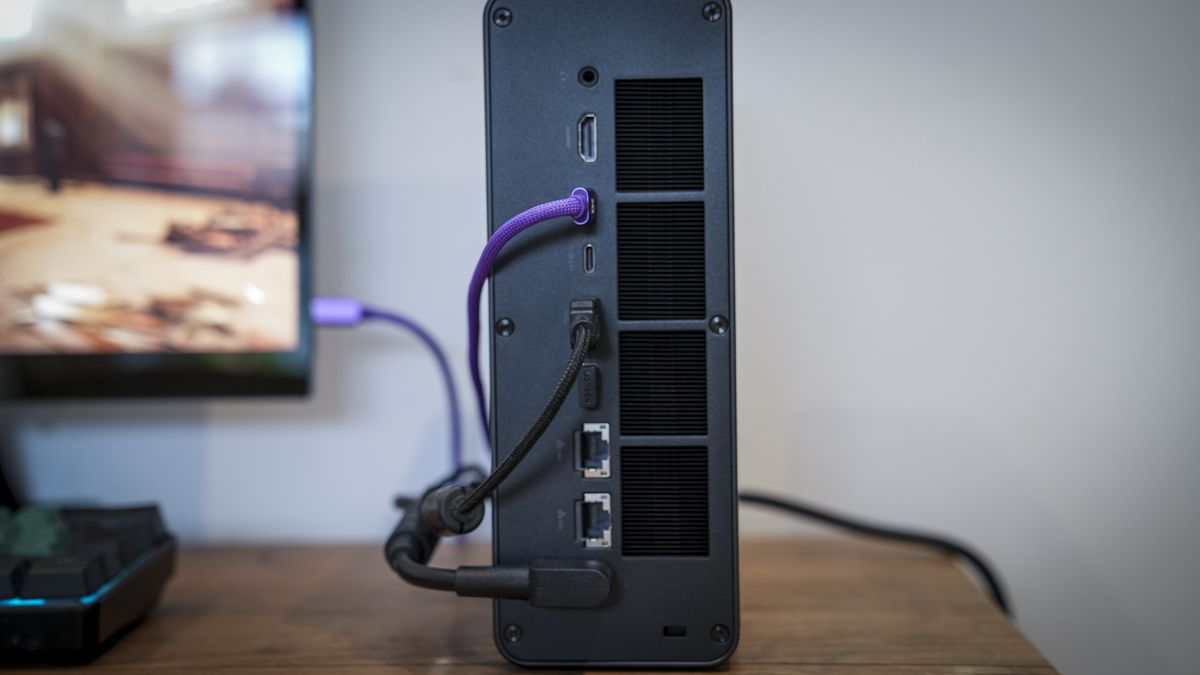
On the rear of the machine, there are plenty of ports, although again, as I’ve seen with these premium machines, the volume of connections is well balanced, with plenty of space given. Options include a 3.5mm audio out, HDMI 2.1, two USB4 v2, two USB 2.0, two 10GbE RJ45 DASH ports, power in and a Kensington lock slot. What interests me is that both RJ45 ports are 10GbE, enabling ultra-fast network speeds if your network can support them.
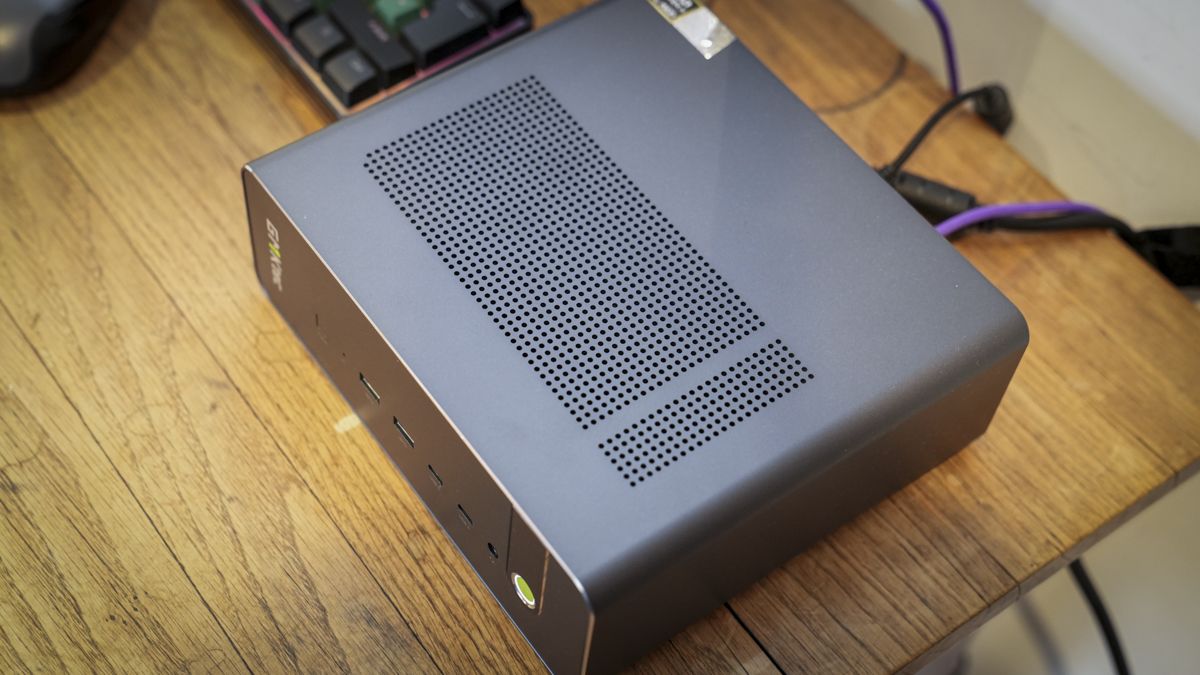
One of the major issues with these smaller machines is keeping everything cool, and inside there is a network of cooling technologies and systems, with the vent structure visible across the back and top of the machine. As the workload increases, this machine does make some noise, but compared with workstations and servers, that noise is well controlled.
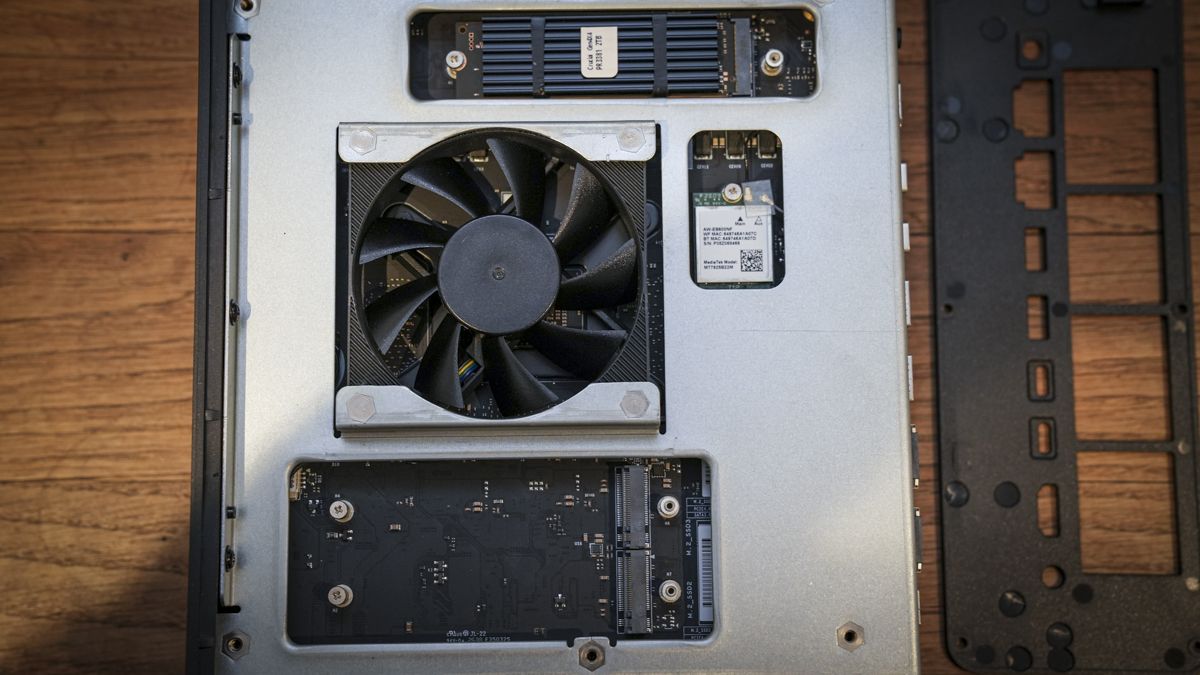
Opening the box, the insides are neatly packed and much more complex in design than I would usually expect in a mini PC. However, the slots for the two additional M.2 sticks are relatively easy to access, with one being a standard M.2 2280 Key-M PCIe 4.0 x4 and the other being M.2 Key-M PCIe 4.0 x1. The RAM is unified, soldered to the motherboard, and not upgradable.
- Design: 4.5 / 5
GMKtec EVO-X5 Pro: Features
The big news on the feature front for the EVO-X5 is the new Ryzen AI Max+ PRO 495. While this only offers a slight uplift when it comes to the clock speed, the AI processing is where the real changes have been introduced, with the two headline points being the boost in the power of the integrated GPU and support for up to 196GB of RAM.
There are, of course, other updates and speed boosts, but for AI processing, the 196GB is the headline, letting the machine hold larger language models in memory. GMKtec claims the 55 TOPS NPU, backed by the RAM boost, should let you run 320B LLMs locally.
The integrated GPU also gets an upgrade to the Radeon 8065S, which retains the 40 RDNA 3.5 compute units but should boost gaming performance slightly. Likewise, the 196GB of RAM is a significant upgrade, especially since both the CPU and GPU share the memory. Again, as with the EVO-X3, the onboard memory is LPDDR5X but increases from 8000MT/s to 8533MT/s, boosting the bandwidth slightly for all that AI processing.
In the creative field, connectivity is always important, and two features that instantly piqued my interest were the dual USB4 v2 80Gbps ports and 10GbE network ports. USB4 v2 is also 80Gbps, but it differs from Thunderbolt 5, which is stricter on some parameters. However, the documentation says you can connect an eGPU if needed.
USB4 v2 also offers broad compatibility with external hard drives and SSDs, which are essential for storage, and it can even add two additional M.2 SSDs, boosting internal storage to 24TB. There are three M.2 2280 slots: two PCIe 4.0 x4 and one PCIe 4.0 x1.
The 10GbE networking meant that, during the test, I could simply link the machine into the wired 10GbE network to access the UGreen INX6100. The transfer rates over the 10GbE network are fast enough for network video editing, and you can access and download all files stored on the NAS locally. The other point here is that while one system is AMD and the other is Intel, with the right LLM commands and setup, you can get the two working together, making it an ideal workflow option for sorting and tagging images, for instance.
Alongside the impressive array of connection ports, there’s also Wi-Fi 7 to ensure fast internet connections. In testing, this also meant that when transferring files to the 3D printers, transfer rates for some of the larger files were exceptionally fast. When this speed was combined with the slicing speed within applications such as Bambu Studio, you can really start to see the machine’s potential.
Two features that are interesting but are beyond the scope of this review are AMD DASH and TPM. AMD DASH stands for Desktop and Mobile Architecture for System Hardware and enables remote access and management. TPM stands for Trusted Platform Module and handles security. These are both aimed at enterprise users.
GMKtec Claw and Herdsman come pre-installed and are both pretty decent. Herdsman is essentially along the same lines as LM Studio or Ollama, while GMKtec Claw features chat and the ability to set up automation tasks. They’re actually a great starting point, and both are evolving quickly, becoming more stable and making greater use of the full power of the machine, something that I noted with the EVO-X3 and the lack of connectivity to the NPU.
Many applications, including those from Adobe, still use the GPU heavily for AI processing, although other applications are starting to use the dedicated AI processor.
- Features: 4.5 / 5
GMKtec EVO-X5 Pro: Performance
Crystal Disk Mark Read: 6961.34
Crystal Disk Mark Write: 6275.46
Geekbench 6 CPU Multi: 20011
Geekbench 6 CPU Single: 2919
Geekbench 6 GPU: 96397
Geekbench 7 CPU Multi: 25091
Geekbench 7 CPU Single: 2700
Geekbench 7 GPU: 96751
PC Mark Overall: 10773
Cinebench R23 CPU Multi (Threads): 37055
Cinebench R23 CPU Single (Threads): 2082
Cinebench 2026 CPU Multi (Threads): 7666
Cinebench 2026 CPU Single (Threads): 465
Fire Strike Overall: 27434
Fire Strike Graphics: 31522
Fire Strike Physics: 34151
Fire Strike Combined: 12099
Time Spy Overall: 10605
Time Spy Graphics: 10703
Time Spy CPU: 10087
Wild Life Overall: 72304
Steel Nomad Overall: 2109
Sky Diver:
Windows Experience Overall: 9.5
Procyon: 1204
The EVO-X5 comes with Windows 11 Pro installed, and as ever, the final steps of the installation were needed before I could get started with installing the benchmark and real-world software applications. What was interesting here, and in common with the EVO-X3, was that GMKClaw and Herdsman were both pre-installed.
Herdsman is essentially the local AI model management and inference platform. Essentially, it’s GMKtec’s option over LM Studio or Ollama, and offers plenty of options to download and manage LLMs locally. For most of the tests, I started with this option. Still, I switched to Lemonade, since I’m more familiar with the server and its ability to monitor token generation and use it for the local AI tests I wanted to run.
Starting the tests, I ran through the usual array of Windows applications, including Microsoft Office, with a focus as ever on Word, to write this review, Excel, to store and query the results from the benchmark tests, and PowerPoint, to put together a series of photography lectures that I have running in the next week. Testing these applications on a machine at this level produced the real-world results I expected. All applications ran at speed with no lag, and switching quickly between them and online formatting tools was fast, keeping up with my editing speed without me ever having to wait for the applications to speed up.
These real-world tests reflected the WEI score of 9.5, and again, that’s backed up by the PCMark score of 10,773, the highest score I’ve seen with any mini PC.
Lightroom and Photoshop, like the Microsoft Office apps, just ran without issue. They were fast and responsive, and with well over 100 images, batch processing in Lightroom ran surprisingly through without issue or pause. Likewise, opening a selection of RAW files from Bridge into ACR, making amendments, and saving was equally quick.
As I pushed the system with 4K video editing, it was clear that even without discrete graphics, performance was excellent. With the 2TB SSD, there was plenty of room to store and edit the footage locally, with the option to offload to the NAS once the edit was complete.
What impressed me here was not only the ability to edit 4K footage from the Canon EOS R5C without slowdown, but also the ability to store that footage on the IDX6011 NAS and utilise the 10GbE network for editing. This meant that there was no need for a desktop SSD, as the speed over the network and with a local cache file was more than fast enough for all the work that I do.
As the complexity of the edits increased, I noticed notable slowdowns when scrolling through the timeline and waiting for colour grade changes to render. However, it was still as fast as my workstation with discrete graphics. However, with the option to link in an eGPU, this would further boost video-editing potential, especially as you start to look at AI integrations with programs such as DaVinci Resolve.
I started using Herdsman and located the largest model I could download and test. This was the DeepSeek-V4-Flash-0731 at 155.7GB. This left little actual headroom for the machine. However, the model worked, though progress was slow; when results came through chat questions, the answers were impressive. Still, even on this machine, the speed was too slow to be truly useful. Switching to Qwen3 30B-A3B at 17.2GB, the difference was instantly noticeable, with swift answers and useful abilities.
However, I wanted to run a series of tests; first, I returned to Lemonade and the SDXL-Turbo model to create a 512 x 512 image of a dog on a beach. The image appeared almost instantly in just 2.5 seconds and was pretty decent. After experimenting a little more, I found the image generation speed and capability were the fastest I have seen so far. Although some images had slightly strange dog eyes, I switched models again and went with Z-Iage-Turbo. This larger 20GB model produced notably better results, though it took longer to render.
The next test, and one that produces all sorts of results, was the website creation task. Here, Qwen3-Coder-Next-GGUF produced the site in 92 seconds, generating 4063 tokens at 45 tokens per second. This was just to generate the code, not to save and organise the files. Still, this was far faster than the EVO-X3 running the same task with the same source files. What was markedly different here was the quality of the site generated. This actually looked like a site, albeit slightly simple, that you could actually use as a point to develop or rework with AI.
Looking through the results, the EVO-X5 clearly outperforms the EVO-X3. It’s not as large a step as I would have thought, but having that additional RAM does mean that larger and more complex models can be loaded, and their abilities are that much greater. However, many language models are designed to adapt to the hardware they’re running on. Still, running those same models on the EVO-X3 and EVO-X5 side by side shows that while everything but the RAM sees a small uplift, the EVO-X5 easily takes the edge in processing and result quality.
Once again, model selection and the LLM Manager are all-important, as is the default token limit your machine can produce. Once you’ve found the model and increased the tokens through the command prompt for that model, things become more impressive. As ever, you also need to look for models that make full use of the NPU, rather than just falling back on the CPU and GPU.
However, across the board, running local LLMs is more than possible, and while many of the speed differences between this and the older EVO-X3 seem small on paper, the real-world realisation of those speeds is marked in use. I found response times were generally faster, with slightly better responses, most notably in website creation. However, as ever, this partly comes down to the AI model's response at the time, and you will always get a different response from the same model on different systems.
That said, the extra RAM does seem to make a difference, letting you run more models in memory and reducing loading and unloading. It also means that you can comfortably run other applications and AI models together, such as Visual Studio or DaVinci Resolve, with some impressive results. This use of running an AI Model alongside Visual Studio or DaVinci Resolve is where the real power comes into play, and from this angle the step up from the EVO-X3 to the EVO-X5 is greater.
While this machine has AI potential, you can still use AI Managers and models to balance what you want the system to do.
The final part of the test was to run a few games, and here again, the power of that CPU and integrated GPU was impressive, with Indiana Jones and the Great Circle running at 1080p extremely well. Likewise, Cyberpunk 2077. If you do want to increase the resolution and effects, then a dedicated eGPU would be a good idea, but out of the box, the performance is still impressive.
At the end of this test, the machine more than proved its abilities and also enabled me to push testing and experimenting with local AI to a greater degree than I have been able to before. The main point for me that helps to balance the cost is the creative and admin potential. This machine rips through video, transcoding quickly when needed, and the auto video editing in DaVinci Resolve is incredibly impressive; however, as ever, there is a learning curve, as these features take time to set up.
- Performance: 4.5 / 5
GMKtec EVO-X5 Pro: Final verdict
The EVO-X5 is an interesting machine and, without doubt, the most powerful AI-enhanced mini PC I have looked at so far. What surprises me is that the performance, while better in many respects than the EVO-X3, doesn’t feel much better to justify the current price difference. However, once you look at the current cost of RAM, that increase becomes apparent.
If you are running the EVO-X3, it's a powerful AI machine and will do pretty much everything the EVO-X5 will do, though the process will be slightly different because it doesn’t have as much headroom in RAM capacity.
I have also noted that newer local language models allocate resources better, so while many models thrive in this machine with that extra RAM, plenty of new-generation models are better adapted to memory allocation and seem to run as well on the EVO-X3 with its 128GB of RAM.
However, in use, there’s no doubting this compact machine's speed and abilities. For standard office work, it’s exceptional, and for creative work, it’s surprisingly agile; with a dedicated eGPU to boost graphics processing, it will be a formidable option for video and photo editing.
While this machine is decent for gaming, it’s not designed for it, so a quick dip into the gaming world after work is possible, and the gameplay quality is exceptional. However, if that is what you want the machine for, a dedicated gaming machine will be cheaper.
The new CPU and enhanced RAM deliver the headline performance upgrades, and you can run larger models, making it what it is supposed to be; at present, most of that cost comes from the RAM. So if you want to run larger language models, you will need to stretch to this latest model. However, the EVO-X3 is still an excellent, cheaper option, and at present is equally impressive if slightly less powerful.
Should I buy the GMKtec EVO-X5 Pro?
Value | Excellent performance, but the high price limits its appeal. | 3.5 |
Design | Compact, well-built and understated, with excellent connectivity. | 4.5 |
Features | Extensive connectivity, huge memory capacity and impressive expandability. | 5 |
Performance | Exceptional AI processing and strong creative workstation performance. | 4.5 |
Overall | A powerful, versatile mini PC with a premium price. | 4.5 |
Buy it if...
You want to run large AI models locally.
With its huge unified memory capacity and powerful processor, the EVO-X5 Pro can handle large language models locally that would push most conventional mini PCs beyond their limits.
You need a powerful compact creative workstation.
For large image libraries, 4K video editing, and AI-enhanced creative applications, the EVO-X5 Pro delivers excellent performance, fast networking, and extensive storage options in a compact design.
Don't buy it if...
You only need a mini PC for everyday work.
For office applications, web browsing, and general creative work, the EVO-X5 Pro offers far more power than you need. Cheaper mini PCs, including the EVO-X3, provide better value.
You need a workstation with powerful dedicated graphics.
While the integrated graphics perform well, demanding 3D work and complex video editing benefit from a dedicated GPU. A conventional desktop workstation may offer better value.
For more professional-grade desktops, we've tested the best business computers.