Building a GPU workstation for visual effects with Amazon EC2: Part 5 – Security

For many years Amazon Web Services (AWS) has been guiding users in the deployment of powerful NVIDIA GPU backed workstations for graphics intensive workloads. With the recent expansion of our G-series Amazon Elastic Compute Cloud (Amazon EC2) graphics-based instances, we’re excited to introduce new instance families that deliver enhanced performance and capabilities. We’re also refreshing our comprehensive guidance on choosing and configuring these powerful virtual workstations.
This is the fifth post in a five-part series, exploring security practices related to the deployment of visual effects (VFX) workstations: how to secure these workstations by controlling who can reach the desktop, protecting the session in transit, and safeguarding the credentials, images, and storage behind it. The following screen capture shows these GPU-powered workstations in use, in a real production environment.
Figure 1: Amazon EC2 GPU-powered workstations, used in a Studio-in-the-Cloud courtesy of Outpost VFX
Before you begin
This post builds upon topics covered earlier in the series, regarding Linux and Windows EC2 instances, configured for the purposes of creating GPU workstations.
If you want to understand more about GPU accelerated Amazon EC2 G graphics instances, go to Part 1 in this series: Build a GPU workstation for visual effects on Amazon EC2: Part 1 – Setup.
For deployment instructions for creating a Rocky Linux graphics workstation, go to Part 2 in this series: Building a GPU workstation for visual effects on Amazon EC2: Part 2 – Linux.
For creating a Windows Server 2025 graphics workstation, go to Part 3 in this series: Building a GPU workstation for visual effects with Amazon EC2: Part 3 – Windows.
Finally, for methods to standardize and optimize instances, for rapid re-use at scale, go to Part 4 in this series: Building a GPU workstation for visual effects with Amazon EC2: Part 4 – Optimizations.
Security considerations
When deploying EC2 instance workloads on Amazon EC2, security hardening isn’t only a best practice but also essential for protecting your infrastructure, data, and applications from evolving threats. AWS provides secure cloud infrastructure, but the responsibility for securing the operating system and applications running on your EC2 instances falls squarely on you as part of the AWS Shared Responsibility Model. While AWS secures the underlying infrastructure (the physical servers, networking equipment, and hypervisor layer), you’re responsible for everything from the guest operating system upward. This includes patching, configuration management, access controls, and monitoring. A misconfigured EC2 instance can become an entry point for unauthorized users, potentially impacting more than that single instance in your AWS environment through lateral movement.
Throughout this post series, we’ve implemented security best practices aligned with the AWS documentation on Best practices for Amazon EC2. As we conclude, let’s revisit the key security principles we’ve applied and explore additional considerations for production environments.
Amazon DCV connection security
Amazon DCV provides immediate out-of-the-box encryption of pixels and end-user inputs, and to do so it creates a self-signed certificate. As previously mentioned, the browser issues a security warning when you connect by default. This is expected because the browser can’t verify the certificate’s authenticity in terms of domain or validity by a Certificate Authority (CA). Amazon DCV doesn’t immediately know your domain requirements for servers or clients. You elect to accept the risk based on your knowledge of the IP in question that you are connecting to.
Amazon DCV itself has further configurations that can mitigate potential security risks. For example, the DCV server can perform administrator-defined regex filtering on origin and host names to protect against WebSocket hijacking, and Host Header attacks. On Linux, add the following to dcv.conf, typically found at /etc/dcv/dcv.conf:
On Windows, you add the respective string values for each parameter subkey within the Computer\HKEY_USERS\S-1-5-18\Software\GSettings\com\nicesoftware\dcv\security registry key. The following screen capture shows this registry key open in Registry Editor, with the connectivity-restriction values in place. In this example, two values are defined under the security key (allowed-ws-origin-regex and allowed-http-host-regex) each set to a regular expression that limits connections to a specific domain.
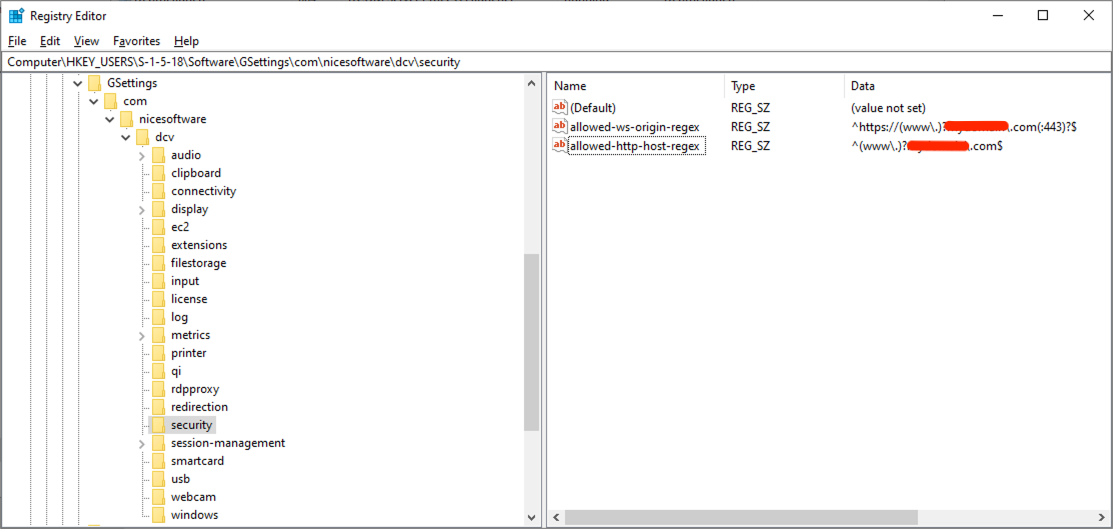
Figure 2: The Amazon DCV registry security key, with subkeys limiting host and origin connectivity
For more information about security parameters with Amazon DCV, see security parameter reference of the Amazon DCV Administrator Guide.
Amazon DCV clients requesting connections to the Amazon DCV server can be restricted through fundamental network-level controls that allow requests from specific IP addresses and ports:
- AWS Network Access Control List (ACLs) restrict inbound and outbound traffic at the subnet level on the VPC.
- AWS Security Groups (as already mentioned and used in this post) apply another layer of restrictions on incoming IP addresses and ports to the server instance.
- Firewall rules can further restrict incoming IP addresses and ports.
To extend both the functionality and security of Amazon DCV, an Amazon DCV Connection Gateway can also be used as part of a more extensive infrastructure, to act as an intermediary between clients and servers. From a security point of view, it adds a single point of entry, hiding the servers behind the gateway, mitigating load, but also implementing a token-based authentication system to resolve server sessions for clients.
Whilst these steps prevent unauthorized access attempts from unexpected sources, it doesn’t solve the certificate trust warning. To improve both the user experience (to resolve the warning, and the general question of is this secure?) as well as strengthen your security defenses, consider using your own certificate from a trusted CA. This is beyond the scope of this post, but services such as AWS Private Certificate Authority provide the ability to create certificates that encapsulate your domain and can be trusted by the browser as a legitimate CA. Not only does this simplify the user experience but it also provides cryptographic verification of server identity and protection against man-in-the-middle attacks.
Network security
We have repeatedly applied the principle of least privilege, using Security Group rules to restrict access to known IP addresses only. As detailed in Part 1 of this series, the choice of connectivity method significantly impacts your security architecture, and while this post uses internet connectivity for simplicity, production environments should evaluate additional security layers based on their requirements. Network Access Control Lists (NACLs) can also be used for subnet-level traffic filtering as an additional defense layer to security groups, and AWS Network Firewall offers advanced threat protection and intrusion detection.
For enhanced security postures AWS Site-to-Site VPN adds network-layer IPsec encryption on top of the application-layer security of Amazon DCV, protecting against man-in-the-middle attacks, traffic analysis, and DNS hijacking while allowing workstations to reside in private subnets. AWS Direct Connect further strengthens security by bypassing the public internet entirely through dedicated fiber connections, reducing exposure to internet-based DDoS attacks, ISP-level surveillance, and routing attacks.
If you have strict compliance requirements, also consider deploying Amazon DCV servers in private subnets with AWS PrivateLink endpoints for fully private connectivity. For comprehensive guidance on these connectivity options and additional firewall and protection services that enhance protection against exploits such as ransomware and DDoS, see Security, Identity and Compliance on AWS (refer back to Part 1’s detailed comparison of connectivity architectures).
AWS Identity and Access Management (IAM)
IAM securely controls access to AWS. With IAM, you can manage authentication and authorization and grant your identities only the least-privilege permissions required for their tasks, reducing the risk of mistakes or unauthorized behavior. Throughout this post series, we’ve applied this principle of least privilege to IAM roles and policies. For example, we attached IAM roles to EC2 instances rather than using long-lived static credentials, eliminating the risk of exposed access keys.
For example, for the purposes of this post, we used read-only policies for S3. For production environments, we recommend taking this further by prescribing:
- Access to specific S3 buckets using resource-level permissions.
- For example,
arn:aws:s3:::amzn-s3-demo-bucket/*.
- For example,
- Limiting actions to only what’s required.
- For example,
s3:GetObjectinstead ofs3:*.
- For example,
Credential security
As a best practice, we recommend changing default passwords immediately and aligning them with your organization’s password quality requirements, such as 16 or more characters with mixed case, numbers, and symbols. Any SSH key pairs should be rotated regularly in line with your organizational requirements.
Monitoring and logging
You can use a number of tools and services to monitor activity within an AWS account. For example, use AWS CloudTrail to audit IAM actions and API calls for compliance and security, and implement Amazon CloudWatch alarms to warn about specific security events. AWS Identity and Access Management Access Analyzer can be used to identify resources shared with external entities and validate that your IAM policies grant only intended access, whilst VPC Flow Logs monitor and allow you to audit network traffic patterns within your network. For vulnerability detection, Amazon Inspector can scan EC2 instances for software and network exposure, whilst Amazon GuardDuty can continuously monitor for threat detection across your infrastructure, looking for suspicious or malicious behavior.
Encryption
Encrypting your data at rest, and in transit helps protect against unauthorized access even if storage media is compromised or network traffic is intercepted. In these posts we made sure that Amazon Elastic Block Store (Amazon EBS) volumes for our instances were all encrypted using AWS Key Management Service (KMS) for encryption key management, providing cryptographic verification and centralized key rotation capabilities. We explored Transport Layer Security (TLS) encryption for Amazon DCV, which helps protect your desktop pixels and user inputs during transmission using TLS v1.2 or greater with strong cipher suites.
Patch management
Consider build-time hardening services such as EC2 Image Builder to automate the creation of Amazon Machine Images (AMIs) that apply the latest security patches, remove unnecessary components, and install anti-malware protection.
For lifecycle management, AWS Systems Manager Patch Manager can automate patching across your fleets. It uses patching policies that scan for and install approved updates on a schedule you define (weekly is recommended). Patch Manager is particularly valuable for fleet-wide VFX workstations because it centralises patching control across multiple accounts and AWS Regions. It supports custom patch baselines, so you can define what counts as compliant for your organisation. It also integrates with AWS Security Hub CSPM (Cloud Security Posture Management) and AWS Config for greater visibility, and it maintains audit trails through AWS CloudTrail.
Backup and recovery
Amazon EBS snapshots represent a cost-effective, encrypted, point-in-time backup of your instance data (such as the operating system and applications) residing on EBS volumes. They’re stored in Amazon Simple Storage Service (Amazon S3). Incremental versions only store the deltas in data from previously stored volumes (deletions of snapshots only remove unique data associated with that volume). With snapshots, you can retrieve a prior state (snapshot) of an instance and resume work or even turn a snapshot into an AMI for more permanent use. Whilst many companies using VFX workstations on AWS tend to regularly launch new daily instances for their artists (avoiding ‘stopped’ state charges overnight and ensuring artists are using up-to-date AMIs), long-term use of Amazon EC2 instances can use EBS snapshots to instigate disaster recovery preparation against accidents, corruption, or ransomware. It’s vital when using disaster recovery processes such as EBS snapshots, that testing is done to confirm that recovery procedures work when needed.
Conclusion
This post has covered essential security practices including network controls, IAM policies, encryption, monitoring, and threat detection, which are all foundational elements of a comprehensive security strategy. For production deployments, we strongly recommend consulting the AWS Security Best Practices documentation and the AWS Well-Architected Framework Security Pillar to explore additional security services, compliance frameworks, and industry-specific guidance tailored to your organization’s requirements.
For more information contact us at aws-visual-compute-interest@amazon.com.